
Database management
As you upload more hands to FlopHero, your database will grow into a powerful tool for understanding your long-term performance. Keeping this database organized is key to getting clear and accurate insights. FlopHero provides a dedicated section for managing your uploaded sessions, allowing you to review detailed metrics, sort through your history, and delete any sessions you no longer need.
This guide will show you how to access and use the Database page to keep your workspace clean. We'll cover how to interpret the session data, how to delete individual or multiple sessions at once, and some best practices for effective database management. A well-maintained database ensures your overall statistics reflect the hands you truly want to focus on.
Accessing the Database page
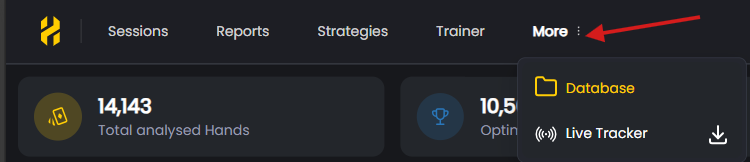
All your uploaded hand history files are managed on the Database page. It's important to note that this is not a main tab in the top navigation. To get there, click on the More menu in the top right of the navigation bar, and then select Database from the dropdown menu.
This page provides a comprehensive overview of every file you've ever uploaded, along with a detailed breakdown of your performance in each one. It's the central hub for managing your hands history archive.
Understanding the Database view
The Database page is designed to give you a high-level summary of your performance across all your sessions. At the top of the page, you'll see several statistics cards that summarize your entire database, including Total Analysed Hands, Optimal Plays, Strong Plays, Weak Plays, and Blunder Plays.

Below these cards is a detailed table listing every session file you've uploaded. Each row represents a single file and contains the following information:
- Session file name: The original filename of your hand history file.
- Upload date: The date the file was uploaded to FlopHero.
- Site: The poker site where the hands were played.
- Hands vs. Available: The total number of hands in the file versus the number of hands that were successfully analyzed.
- Quality Breakdown: Columns for Optimal, Strong, Weak, and Blunder plays, showing the count and percentage of each.
- ΔEV: The total GTO Delta EV for the session showing the difference between the action you took and the best possible GTO action.
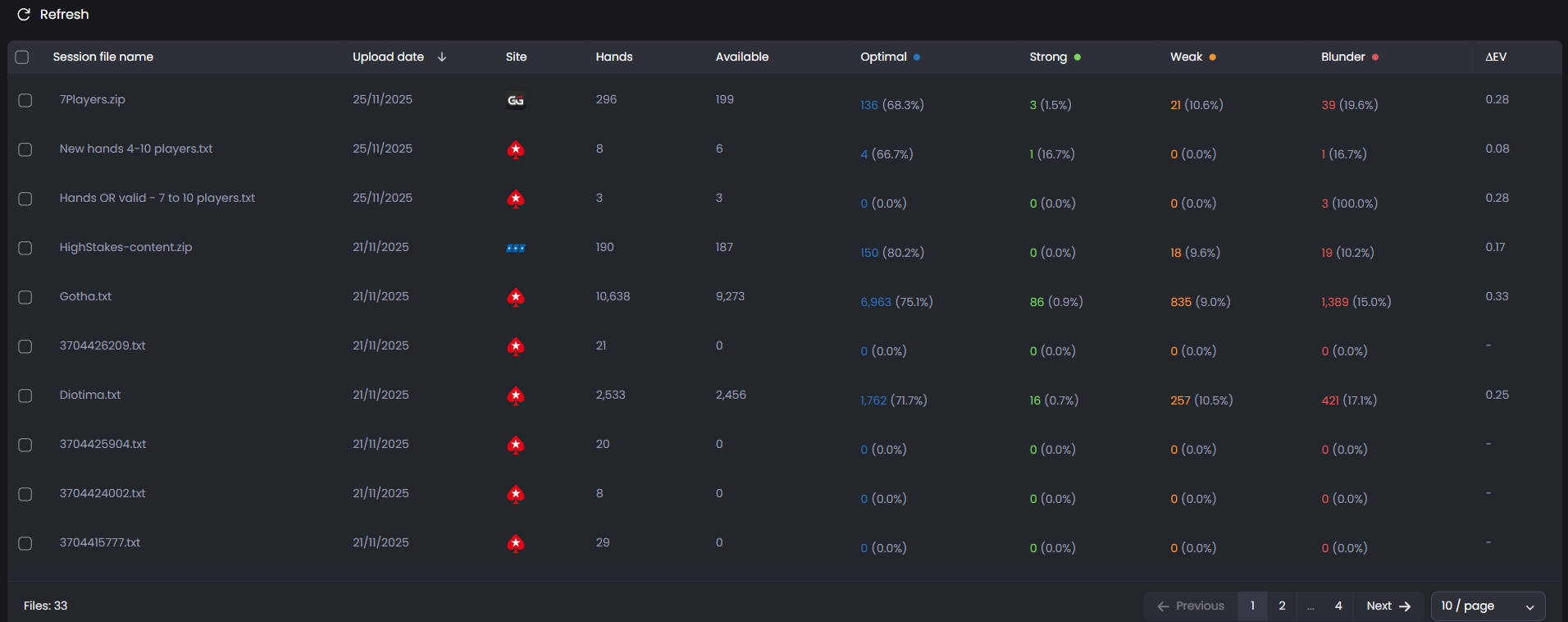
This view is incredibly useful for spotting trends. You can find your biggest winning or losing sessions, identify sessions with a high number of blunders, or simply locate a specific file by its name or upload date. For more on interpreting these metrics, see Session Dashboard.
How to delete sessions
Keeping your database clean is important for accurate long-term stats. You may want to delete sessions for various reasons, such as duplicate uploads, incorrect files, or hands from a stake you no longer play. The Database page makes this easy.
To delete one or more sessions, simply use the checkboxes on the left side of the table to select the files you want to remove. As soon as you select a file, a red Delete session(s) button will appear at the top left of the table. The number in parentheses shows how many sessions you have selected.
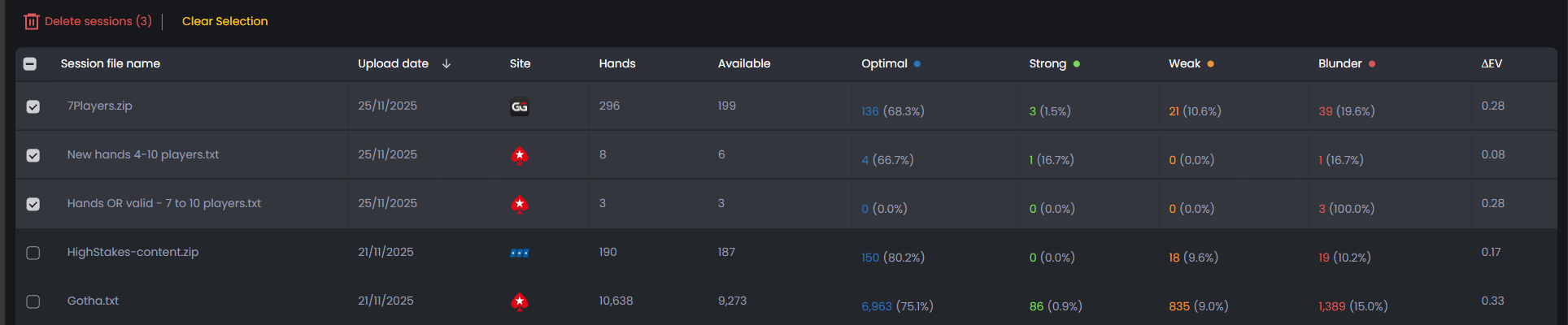
Once you've selected all the sessions you want to remove, click the Delete session(s) button. The selected sessions will be permanently removed from your database, and all of your overall statistics will update automatically. Be careful, as this action cannot be undone.
Best practices for database management
- Delete duplicates promptly. While FlopHero automatically detects and rejects duplicate files upon upload, you may occasionally end up with similar sessions from different files. Removing them ensures your stats aren't skewed.
- Review your files regularly. Periodically scan your database for old or irrelevant sessions. Keeping only the data that matters to your current game will make your analysis more focused.
- Use the quality metrics. The breakdown of Optimal, Weak, and Blunder plays is a powerful tool. Use it to find sessions with a high percentage of mistakes and prioritize them for review.
- Don't be afraid to start fresh. If you've made a major change to your strategy, you might consider deleting all your old hands to get a clean read on your new performance. Before doing so, be sure to download a backup of your data from your account settings.
- By following these simple practices, you can maintain a clean and organized database that provides a true reflection of your poker journey. For more information on uploading new hands, see Hand Upload. To review your uploaded sessions in detail, check out Handlist.
Was this article helpful?
Still need help?
Join our community
Get instant support from experts and fellow players
Join Discord Community